
|
|
|
This page contains a list of vulnerabilities that I have identified and/or researched since March of 2006. All bugs were reported responsibly and fixed prior to disclosure on this web site. The target institution or product is confidential in some reports and available in others. The icons on this page are taken from the MINIMALIZM v1.0 icon set by (Razor99).
Note: The bank has been notified of this vulnerability. All instances of the bank's real domain have been replaced with fakesite.com. The variable names and values have also been modified to prevent people like *you* from using a search engine to identify the bank. An SQL injection vulnerability exists in a bank web site, which allows an attacker to gain access to a password protected maintenance area. The injection breaks the SQL query logic such that when padded with the proper syntax, an incorrect user name and incorrect password allows the user to access sensitive pages. In particular, this vulnerability exists in /work/auth.asp of the web site, because it does not filter input for the login_user (login name) and login_pass (login password) variables. A user would enter values for these variables by submitting data to the auth.asp page, which is freely accessible: 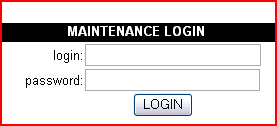 By viewing the source code of the page, you can see that the login text box fills the login_user field and the password box fills login_pass. The relevant code is shown below for reference. [form action="auth.asp" method="post"] [font size="2" face="Arial, Helvetica, sans-serif">login:[/font][/td] [input name="login_user" type="text" size="25" value=""] [td][font size="2" face="Arial, Helvetica, sans-serif"]password:[/font] [/td][input name="login_pass" type="password" size="25"] The form is designed so that login failures result in a simple refresh of the current page and login success results in access to the maintenance area. The form distinguishes between success and failure by querying a local Access database with the user supplied values for login_user and login_pass. If the query status returns true, the user is authenticated. The problem is that no filters are applied to login_user and login_pass before they are used in the SQL query. An attacker is thus able to manipulate the query in a manner of his choosing, with the ultimate goal of forcing the query to return true, regardless if the user name and password are correct. Here is the SQL query, taken from like 421 of the auth.asp page. Note that I have access to the source, which real attackers would not. Their attempts to discover this vulnerability would be much more difficult, though certainly possible. 421 SQL = "SELECT user_id, user_lgn, user_name FROM ADMIN
WHERE user_pwd ='"&Request.Form("login_pass")&"'
AND user_lgn ='"&Request.Form("login_user")&"' ;"
For readability, I've highlighted the code which is replaced by the two user-supplied values (all content between the two single quotes). A legitimate (legit as in syntax, not legit as in credentials) entry such as this: 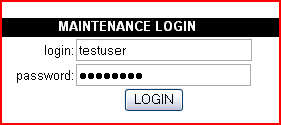 ...would result in the following query being executed: SQL = "SELECT user_id, user_lgn, user_name FROM ADMIN WHERE user_pwd ='testpass' AND user_lgn ='testuser' ;" Since testpass/testuser is not a valid combination of credentials, this query will return false. However, by carefully injecting our own code into the query, we can force it to return true. This can be done by bending the logic a bit. Instead of making a SELECT query for criteria where user_pwd='testpass', we can make a query for criteria where user_pwd='testpass' OR 1=1. This is a classic SQL injection technique. Since 1=1 will always be true, and the "OR" operator is being used, then as long as one of the conditions are true - the entire statement will be true. The goal can be accomplished by entering a user name and password such as the following: 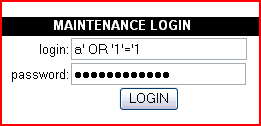 The password in this case is the exact same as the user. Examine the fields from the query again - blank at start, then take a look after our injected code. The single quotes in the login and password fields serve to terminate the two variables and allow extra criteria to be inserted while maintaining proper SQL syntax. WHERE user_pwd='' AND user_lgn ='' WHERE user_pwd='a' OR '1'='1' AND user_lgn ='a' OR '1'='1' Once again, a false user name and password have been entered ("a" for both), but this time the query returns true due to the OR operator and we are granted access.  |
|
