|
|
|
This page contains a list of vulnerabilities that I have identified and/or researched since March of 2006. All bugs were reported responsibly and fixed prior to disclosure on this web site. The target institution or product is confidential in some reports and available in others. The icons on this page are taken from the MINIMALIZM v1.0 icon set by (Razor99).
There are several critical SQL injection vulnerabilities in a U.S. bank web site. In particular, View.asp and Apply.asp are vulnerable because they do not properly filter user-supplied input before accepting the given values and issuing a query to the database. With the vulnerabilities, an attacker can learn information about database structure such as table names, column names, and active software packages. The weakness can also lead to exposure of administrator user names and passwords, and any other data stored in the same Access database. In the first example, the View.asp page does not filter or escape single quotes from user input. The single quote is used in SQL as a value terminator, so it can be extremely dangerous when allowed to pass unfiltered. Here is a properly formatted URL to view an existing job posting: https://www.fakebank2.com/Jobs/View.asp?id=67 If a URL is constructed with a single quote character instead of a valid integer, the following error message is displayed on the page: https://www.fakebank2.com/Jobs/View.asp?id='
We now know the vendor and type of server software in use. Also, we know the table (job_list) and column name (job_id). The most difficult part of SQL injection is identifying how the server quotes and creates it's query. If we don't know that information, it will be very hard to inject code that is valid SQL syntax. Consider the following two events: https://www.fakebank2.com/Jobs/View.asp?id='abc
https://www.fakebank2.com/Jobs/View.asp?id='abc'
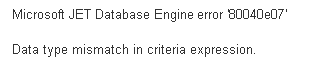
Notice in the first query id is set to 'abc, which results in a sytnax error in the query. Next, when id is set to 'abc', there is a data type mismatch (but the syntax is correct). The datatype mismatch is due to the database expecting an integer and we've fed it a string. Therefore, in order to proceed with any type of injection, we know that id must be an integer and must not be quoted on either side. At this point, it should be evident that injection is possible. It can also be shown a quick example using valid and invalid id integers. For example: https://www.fakebank2.com/Jobs/View.asp?id=0
The value of 0 is not a valid id, which produces this error. The database response is handled in a way which turns the output into an href to "Apply.asp?job_id= <font face=" and fails to print the remainder of the page. The actual injection can be observed by flipping the logic of the query again, with a 1=1 condition. This tells the database to return the first job result regardless if the id is a valid number or not: https://www.fakebank2.com/Jobs/View.asp?id=0%20or%201=1 The URL returns position name, start date, location, description, salary, etc. This shows that even with an invalid value of id, the code we enter afterward is appended to the SQL query before execution. With the proper query, an attacker can construct a UNION query and extract information from other tables in the database with this technique. For example, there exists a table in the Access database named “admin” which stores the user names and passwords of administrators. By appending “union select * from admin” to the jobid variable, the full statement will issue two SQL queries; one that returns information from the job_list table and one that returns information on the admin table. https://www.fakebank2.com/Jobs/View.asp? \ id=0%20union%20select%20*%20FROM%20admin
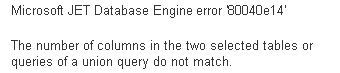
As you can see, this query fails to execute properly because the number of columns in the two select statements are not the same. In other words, by doing “select *” we are asking for data from an arbitrary number of columns; which differs from the number of columns we select in the first (id) query. To fix this situation, we can pad our new select statement with a known, static number of entries (I use 9 in this case but any others should work fine). https://www.fakebank2.com/Jobs/View.asp? \ id=0%20union%20select%20*,9,9,9,9,9,9,9,9%20FROM%20admin
Notice the return values for Qualifications and Salary fields. These are user names and passwords from the admin table of the database. Also notice that we didn't need to issue additional queries to find the actual column names since the * (wildcard) character selects all of them. This technique can be used to print data on the screen found in any column of any table of the Access database; making this a very high risk vulnerability. |
|